Multi-Frequency Billing
This feature is a Private Beta release. Contact Chargebee Support to enable Multi-Frequency Billing for your live and test sites.
Overview
Traditional subscription billing models require all recurring items in a subscription to share the same billing frequency. However, in many subscription businesses today, the core plan and its associated addons are priced and billed on different billing frequencies. For example, a base plan may be sold on an annual commitment, while addons such as support, usage, or feature upgrades are better suited to monthly or quarterly billing.
Multi-Frequency Billing lets you sell a single subscription with multiple recurring items, each billed on its own billing frequency. With this feature enabled:
- Each recurring addon is billed on its own billing cadence, not based on the plan’s frequency.
- The subscription remains unified, eliminating the need to create multiple subscriptions for each addon.
Note:
A single subscription can hold multiple addons, but not more than one plan currently. If you have a requirement to create a subscription for multiple plans of same or different frequencies then please reach out to us at eap@chargebee.com.
Why use Multi-Frequency Billing?
You can use Multi-Frequency Billing if your business:
- Sells long-term commitments with flexible addons.
- Bill usages or overages more frequently than the base plan.
- Prefers operational simplicity over subscription sprawl.
- Wants accurate churn metrics.
The following scenarios highlight where this billing model provides the most value:
Sell addons on flexible billing frequencies
Multi-Frequency Billing makes it easy to cross-sell addons that bill more frequently than your core plan, without changing or renegotiating the base subscription. This is ideal when:
- Your core plan is sold annually.
- Addons are upgradeable, or removable at any time.
- You want to reduce friction for upsells while increasing expansion revenue.
Single Subscription

├── Plan (Annual) ─────────────► Invoiced yearly
├── Addon (Monthly) ──────────► Invoiced monthly
├── Addon (Quarterly) ────────► Invoiced quarterly
└── Metered Addon (Monthly)──► Usage invoiced monthly
Example
Acme Inc. sells a Campaign Management plan, billed annually for $12,000, and an AI Insights addon, billed monthly for $200.
With Multi-Frequency Billing:
- The Campaign Management plan is billed once per year.
- The AI Insights addon is billed every month.
- Customers can add or remove the AI Insights addon anytime, without affecting their annual commitment.
Bill usages in advance without breaking annual contracts
If your base plan is annual but usage-based charges vary month to month, collecting such usage-based charges or overages only during renewal can impact cash flow and create large, unexpected invoices. With Multi-Frequency Billing, you can:
- Keep the base plan annual.
- Attach monthly metered addons for usage or overages.
- Invoice and collect usage charges monthly.
Example
A B2B API platform offers a Base plan that includes 10,000 API units per year billed annually, and Overages are charged based on monthly usage.
Using Multi-Frequency Billing:
- The annual plan renews yearly as usual.
- Monthly API overages are tracked and billed every month via a metered addon.
- Customers get predictable billing, and you avoid large surprise invoices at renewal.
This keeps cash flow steady and makes usage-based pricing much easier to manage.
Keep churn and subscription metrics accurate
A common workaround for mixed billing frequencies is creating multiple subscriptions for the same customer, one annual and the others monthly. Multi-Frequency Billing introduces multiple billing schedules within a single subscription. However, invoicing, payments, and dunning continue to operate at the subscription level, not at the individual addon or plan level. This leads to:
- Duplicate operational work.
- Subscription cancellations to discontinue addons showing up as customer churn.
- Inflated subscription metrics.
Multi-Frequency Billing avoids this by keeping everything under a single subscription.
Before
Customer
├──Subscription A (Annual Plan)
└──Subscription B (Monthly Addon)
After
Customer
└── Single Subscription
     ├── Annual Plan
     └── Monthly Addon
Removing an addon does not cancel the subscription, keeping churn and retention metrics clean.
Understanding Multi-Frequency Billing
Multi-Frequency Billing is designed for businesses that need to combine long-term subscriptions with flexible, independently billed addons or usage charges. The following are some key concepts around Multi-Frequency Billing explained in detail for your understanding:
Billing schedules
Billing dates are driven by each recurring item’s own billing period.
- The plan invoices on its cadence (for example, yearly).
- Each addon invoices on its own cadence. (for example, monthly, or bi-weekly).
- Items due on the same date are bundled into a single invoice.
This differs from plan-based billing, where the plan’s frequency determines the subscription’s billing schedule.
Example 1: Annual plan with a bi-monthly addon
| Item | Billing period | Price |
|---|---|---|
| Plan | 1 year | $1,000 |
| Addon | 2 months | $100 |
Subscription start date: January 1, 2024.
Here’s how invoices are generated:
| Billing date | Billed items | Invoice total |
|---|---|---|
| Jan 1, 2024 | Plan + Addon | $1,100 |
| Mar 1, 2024 | Addon | $100 |
| May 1, 2024 | Addon | $100 |
| … | … | … |
| Jan 1, 2025 | Plan + Addon | $1,100 |
| Mar 1, 2025 | Addon | $100 |
Example 2: Annual plan + monthly addon + quarterly addon
| Item | Billing period | Price |
|---|---|---|
| Plan | 1 year | $1,200 |
| Monthly Addon | 1 month | $50 |
| Quarterly Addon | 3 months | $300 |
Subscription start date: January 1, 2024.
Here’s how invoices are generated:
| Billing date | Billed items | Invoice total |
|---|---|---|
| Jan 1, 2024 | Plan + Monthly Addon + Quarterly Addon | $1,550 |
| Feb 1, 2024 | Monthly Addon | $50 |
| Mar 1, 2024 | Monthly Addon | $50 |
| Apr 1, 2024 | Monthly Addon + Quarterly Addon | $350 |
| May 1, 2024 | Monthly Addon | $50 |
| … | … | … |
| Jan 1, 2025 | Plan + Monthly Addon + Quarterly Addon | $1,550 |
Addon compatibility with a plan
When creating or updating a subscription, Chargebee validates that addons are compatible with the selected plan. The validations include:
- Currency match: The plan and addons must be priced in the same currency.
- Billing frequency compatibility:
- An addon’s billing period must be less than or equal to the plan’s billing period.
- The addon's billing frequency is a divisor of the plan's billing frequency.
Billing frequencies are supported in specific groups (for example, yearly/monthly and weekly/daily). Frequencies from different groups cannot be combined.
The following table illustrates this:
| Plan's Billing Frequency | Addon's Billing Frequency | Permissible? |
|---|---|---|
| 1 month | 1 month | Yes. Same billing frequency. |
| 1 year | 6 months | Yes. Compatible within yearly/monthly billing group. |
| 1 week | 1 week | Yes. Same billing frequency. |
| 1 week | 1 day | Yes. Compatible within weekly/daily billing group. |
| 1 month | 1 week | No. Weekly frequencies are not compatible with monthly/yearly billing frequencies. |
| 1 year | 1 day | No. Daily frequencies cannot be combined with yearly/monthly billing frequencies. |
Editing the next billing date
The plan’s next billing date acts as the anchor date for the subscription. When you edit the plan’s next billing date:
- All existing and scheduled recurring addons are realigned to that date, so that the plan and addons renew together.
- Proration charges or credits are generated if proration is enabled.
This ensures a single consolidated invoice at renewal.
When the next billing date is extended
When the plan’s next billing date is extended, for example, from April 1, 2024, to May 15, 2024(about 45 days), the billing terms of all existing addons are recalculated to align with the plan’s updated renewal date.
This alignment will make the invoice consolidated on the Plan Renewal. Otherwise, Plan & each Addon will renew independently on different timestamps.
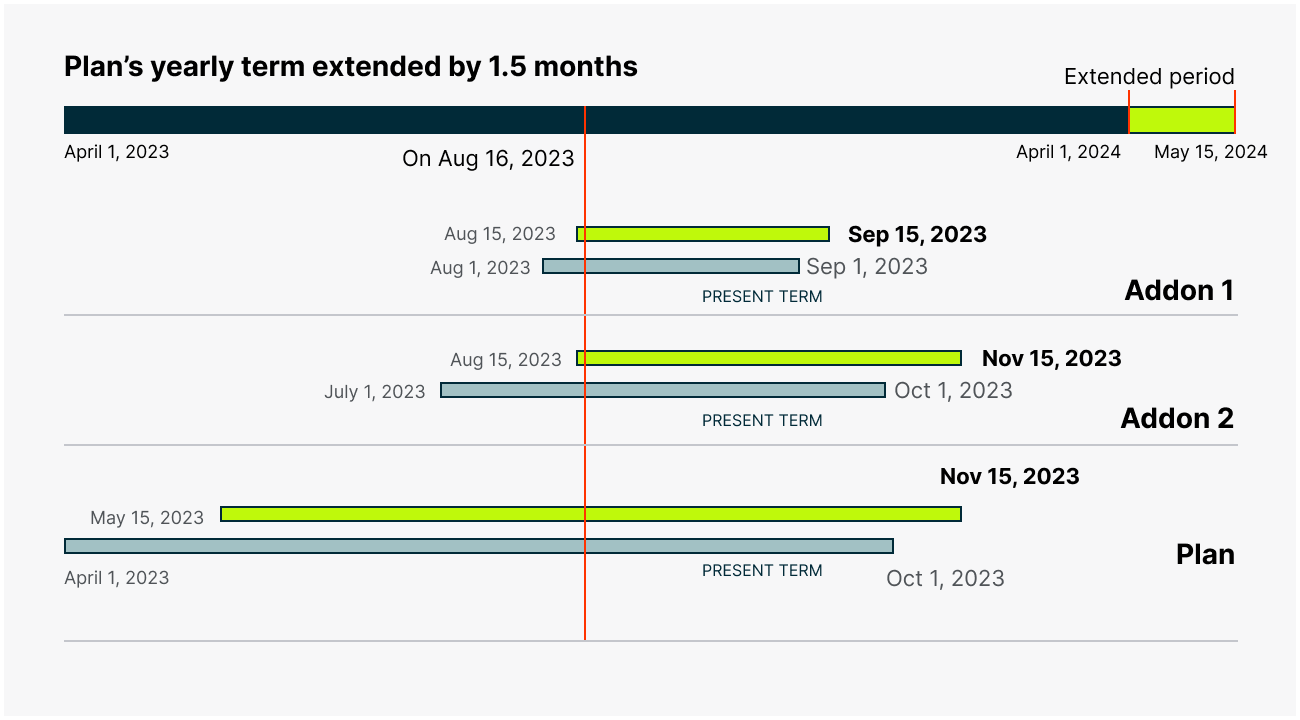
The above diagram illustrates the addon terms aligning to the extended Plan’s Term period.
On extending the next billing date, each Addon either needs to stretch/shrink its current Term so that on Subscription Renewal, all the items in the Subscription will renew together and a single consolidated invoice will be raised. The same approach of aligning with the Subscription renewal is followed while adding any new addon to the existing Subscription.
The alignment is calculated by assuming all the Addons end along with the updated Renewal timestamp and backtracking the term until the term overlaps with the current timestamp.
On following the alignment approach, the first bar in the above diagram depicts the calculated Addon Term that falls for the extended period in our case i.e. 15 May 2024. Hence, the current Addon Term is extended till the respective calculated Addon Term-end.
For the extended period, the Proration is applied, if passed in the input and the invoice will reflect the prorated charges.
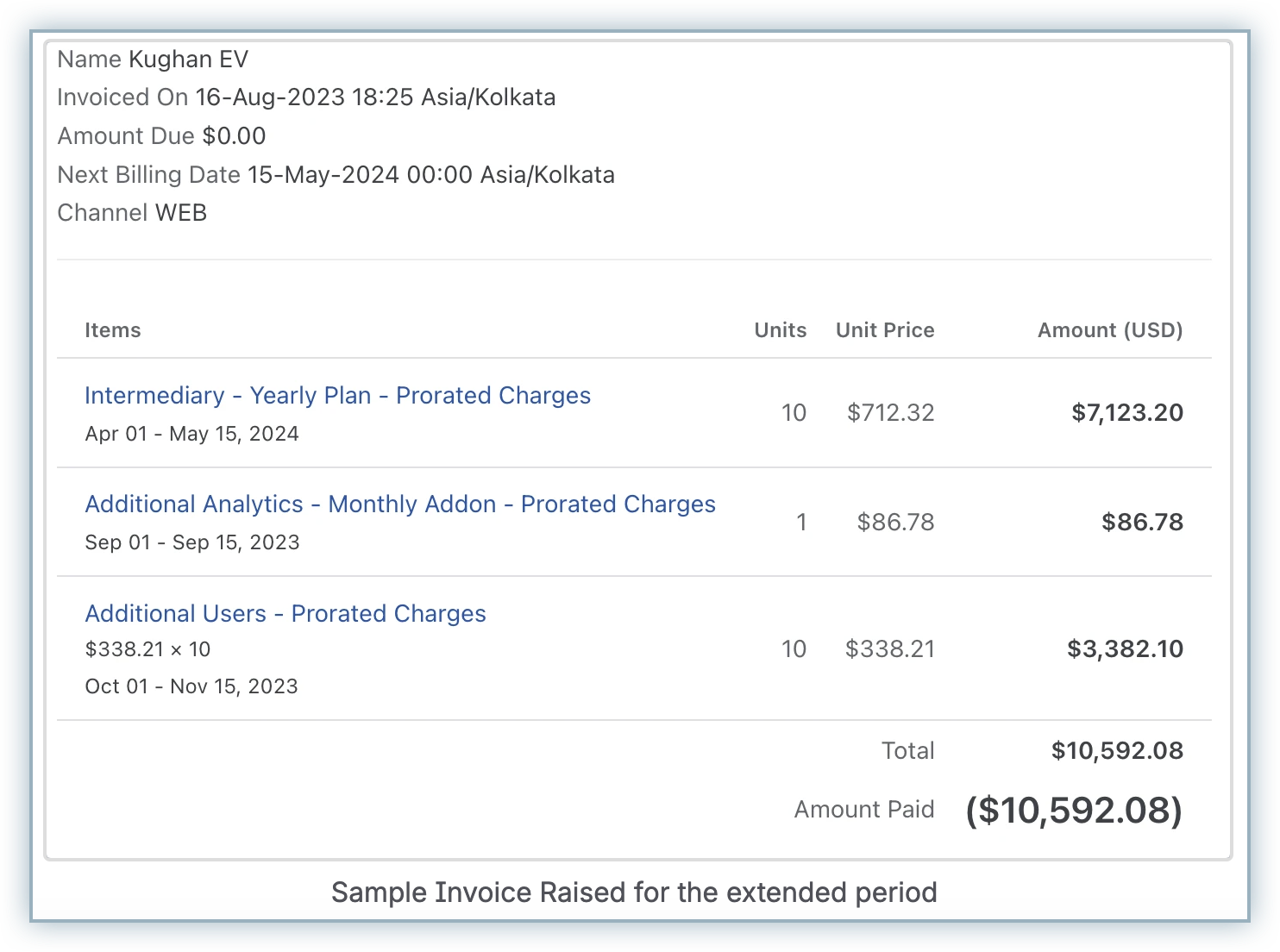
Note:
The same alignment logic is applied when adding new addons to an existing subscription.
When the next billing date is reduced
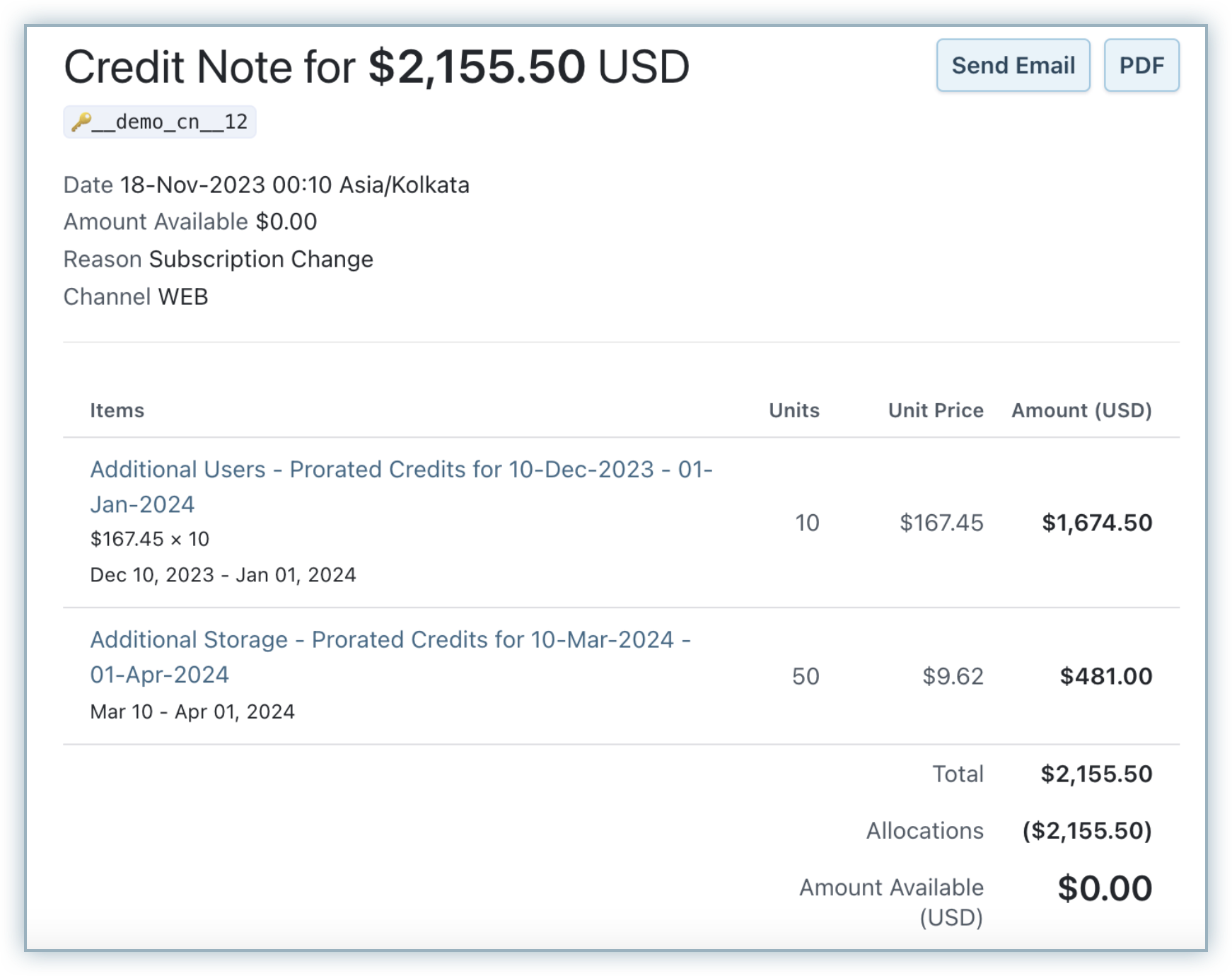
When the plan’s next billing date is moved earlier, for example, from April 1, 2024 to March 10, 2024(about 20 days), the existing addon terms are again adjusted to align with the updated Billing date.
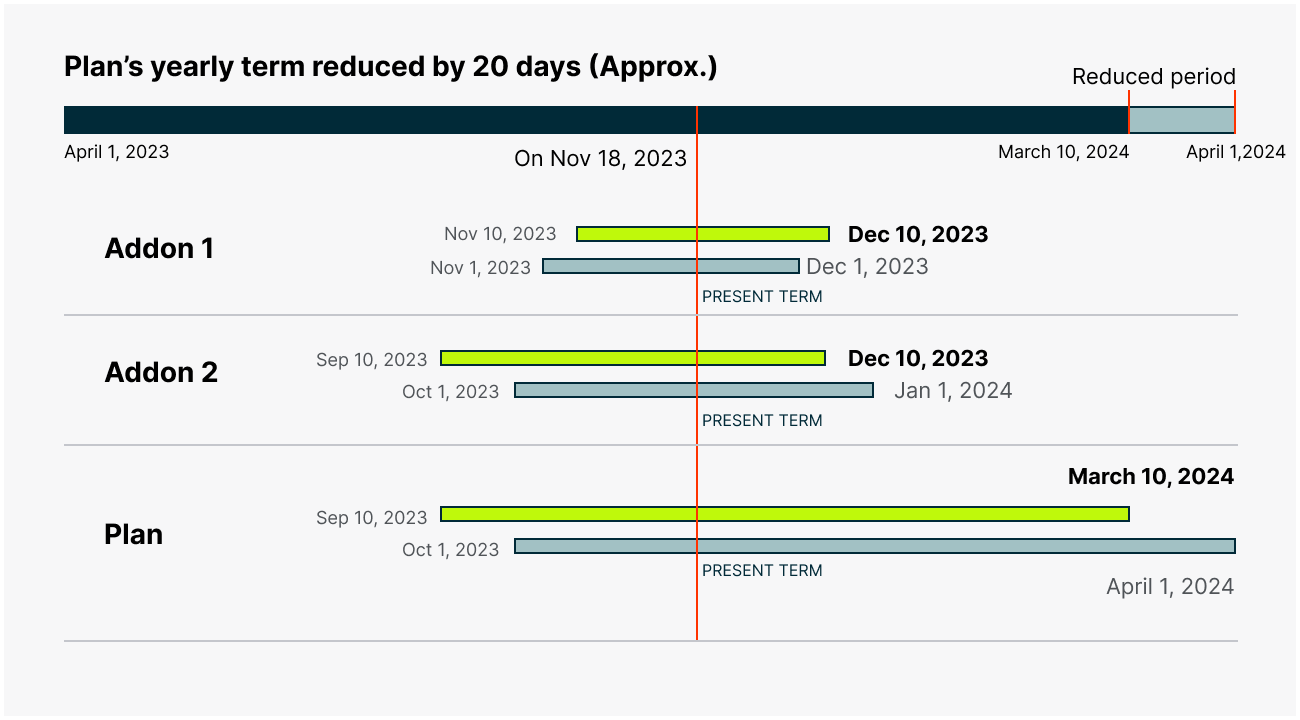
The diagram above illustrates the addon terms aligning to the reduced Plan’s Term period.
In our illustration, as a result of reducing the Next Billing date, certain addon’s Terms need to be extended to their current term (Addon 1) and certain addon’s Terms need to be reduced to their current term (Addon 2 & 3).
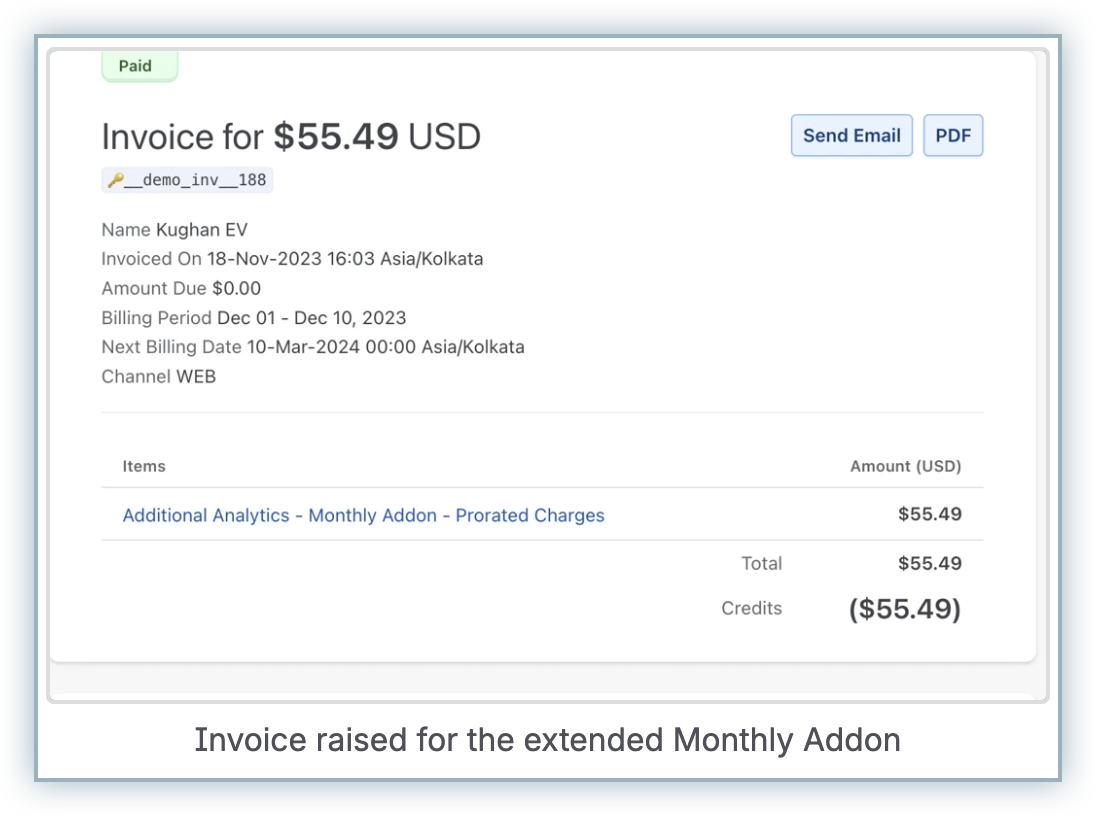
An invoice will be raised for the extended period, and credit will be provided for the reduced period in the Plan & Addon if Proration is enabled.
Fixed billing cycles
You can set a fixed number of billing cycles at both the plan level and the addon level. Fixed billing cycles are applied based on each item’s own billing frequency.
Examples
- 3 cycles on a yearly plan = 3 years
- 3 cycles on a monthly addon = 3 months
If you’re moving from Plan-based Billing to Multi-Frequency Billing, review existing fixed cycle configurations carefully. The existing addons may end much earlier than expected and the fixed billing cycle counts may need manual recalculation.
Plan-based Billing behavior
- Plan: Yearly, fixed cycles = 5 → subscription ends after 5 years.
- Addon: Monthly, fixed cycles = 3 → addon ends after 3 years (because addon cycles effectively align to plan cadence in the plan-based billing).
Multi-Frequency Billing behavior
-
Addons renew based on their own billing frequency instead of the plan’s billing cadence.
-
Fixed billing cycles are applied based on the addon’s billing frequency.
-
For example, if a monthly addon has fixed billing cycles set to 3:
- Under plan-based billing, the addon would last for 3 years (aligned with the yearly plan).
- Under multi-frequency billing, the addon lasts for 3 months (3 monthly renewals).
-
To configure a monthly addon to run for 3 years under multi-frequency billing, you must set the fixed billing cycles to 36 (3 years × 12 months).
Calendar billing
If Calendar Billing is enabled on your Chargebee Billing site, addon renewal dates are automatically aligned to match the plan’s term boundaries. Even if addons have their own frequencies, calendar billing can force renewals to land on the plan-aligned calendar schedule.
Pause and resume subscription behavior
When a subscription is resumed, invoicing depends on whether an addon’s billing cycle ended during the pause period or requires proration based on the resume date.
At the time of resume:
- Addons whose billing cycles have ended are invoiced.
- Addons that are mid-cycle are prorated.
- Addons that are still within their paid billing period do not generate an invoice.
Example
The following example illustrates how invoicing behaves when a paused subscription is resumed.
Subscription state
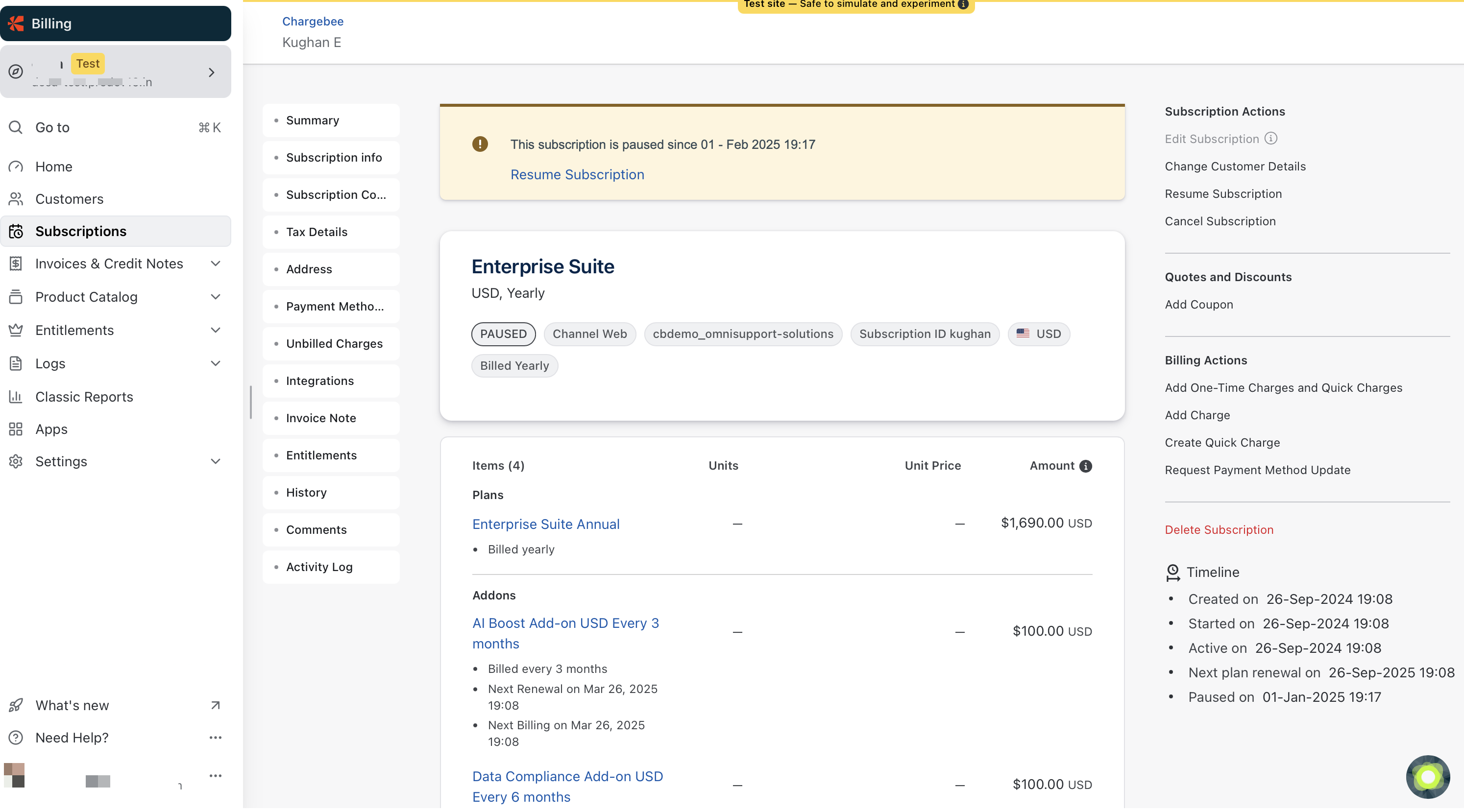
In this example:
- Subscription is paused on: Feb 1, 2025
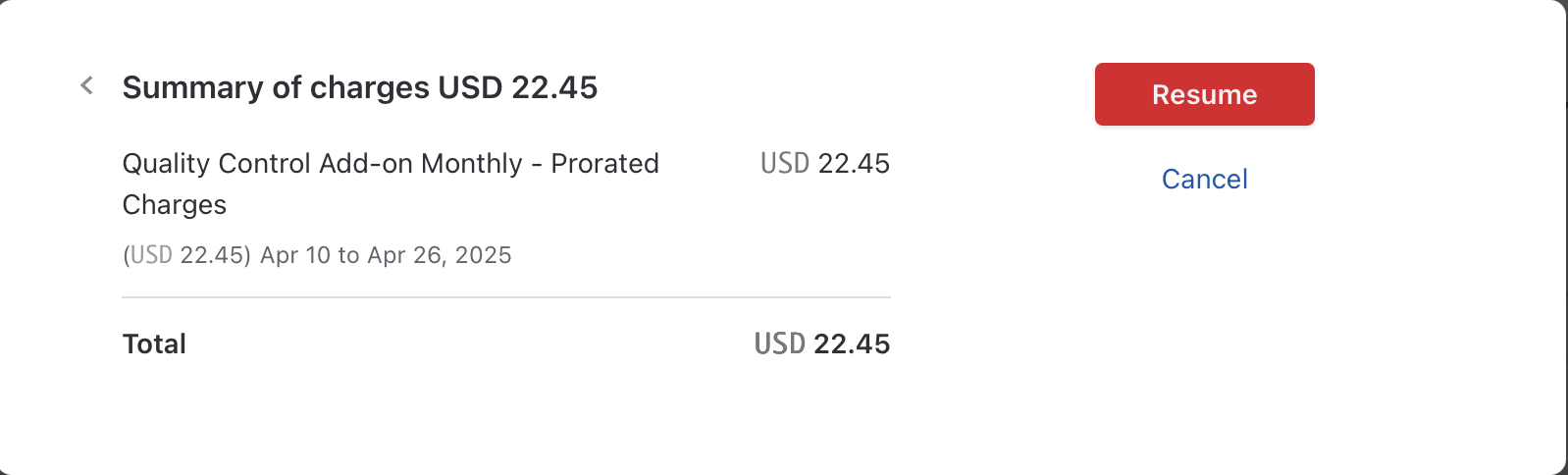
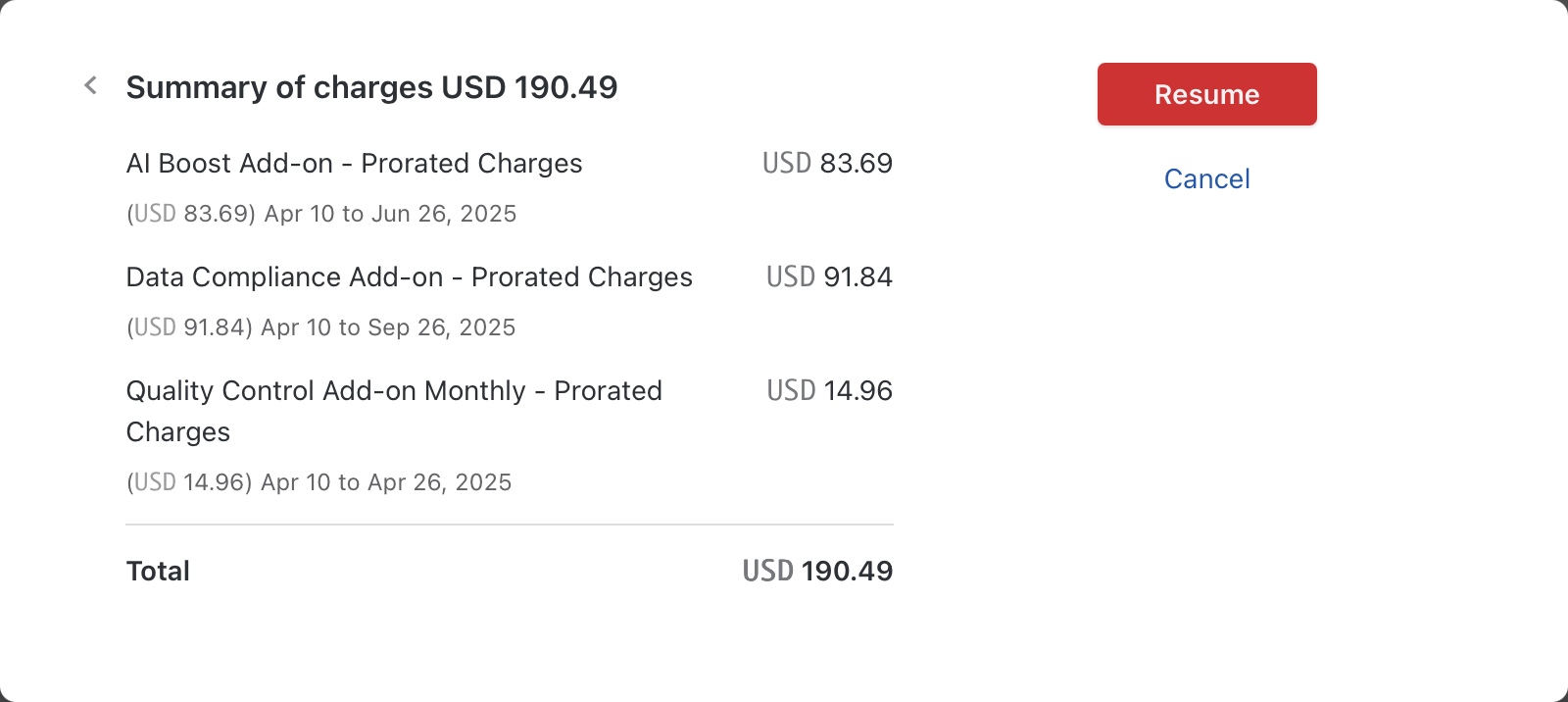
The following scenarios are based on a resume date of Apr 10, as reflected in the invoice screenshots.
Addons and their billing terms:
-
Monthly addon
- Billing period example: Apr 10 to Apr 26
-
Quarterly addon
- Billing period example: Apr 10 to Jun 26
-
Semi-annual addon
- Billing period example: Apr 10 to Sep 26
Resume mid-cycle
If the subscription is resumed mid-cycle (for example, Apr 10):
- The monthly addon is partway through its billing period → prorated charges apply
- Other addons remain within their current billing period → no invoice generated
Resume after billing cycles end
If the subscription is resumed when addons are at different points in their billing cycles:
Each addon is evaluated independently based on its billing period:
- Addons that have completed their billing cycle → invoiced
- Addons still within their billing period → no invoice
- Addons partway through a billing period → prorated
Key behavior
- Billing schedules are realigned to the subscription’s new billing anchor.
- Invoicing is determined independently for each addon based on:
- Billing cycle completion
- Remaining term at the time of resume
Pausing and resuming shift the billing anchor and extend the subscription term. Addons realign accordingly, and invoicing reflects a mix of full charges, prorated charges, or no charges based on each addon’s billing state.
Coupon behavior
When a flat discount coupon is applied to a subscription with multi-frequency billing, the coupon is applied on each invoice generated, not just once at the plan level.
Scenario
Consider a subscription with:
- A yearly plan
- Monthly addons
- A flat discount coupon (for example, $10 off per invoice)
Behavior
-
Without multi-frequency billing:
The plan and addons are billed together based on the plan’s frequency (yearly).
The coupon is applied once on the total invoice for the entire billing period. -
With multi-frequency billing:
Addons are invoiced independently based on their own billing frequency.
The coupon is applied on every invoice generated, including each addon invoice.
Example
- Plan (yearly): $50
- Monthly addon: $20
- Flat coupon: $10 per invoice
Without multi-frequency billing (single yearly invoice):
- Plan: $50
- Addon (12 months): $20 × 12 = $240
- Discount: -$10
- Total: $280
With multi-frequency billing:
-
Initial invoice:
- Plan: $50
- Addon (first month): $20
- Discount: -$10
- Total: $60
-
Subsequent monthly addon invoices:
- Addon: $20
- Discount: -$10
- Total: $10 per month
This behavior continues for each addon billing cycle.
MRR calculation
MRR is calculated by normalizing each recurring item based on its own billing frequency.
Example
Subscription includes:
- Annual plan: $120/year → $10/month
- Addon A (monthly): $50
- Addon B (monthly): $20
MRR calculation
- Plan = $120 / 12 = $10
- Addon A = $50
- Addon B = $20
MRR = $10 + $50 + $20 = $80/month
If Addon B has fixed billing cycles = 1 (exists only for 1 month):
-
Month 1
- Plan = $10
- Addon A = $50
- Addon B = $20
- MRR = $80
-
Month 2 and later
- Plan = $10
- Addon A = $50
- Addon B is no longer active
- MRR = $60
Estimates
- Subscription renewal estimates reflect the plan’s renewal window.
- Use Next Invoice Estimate to preview upcoming addon invoices.
Note:
Next Invoice Estimate is currently available only at the customer level and not available at the subscription level.
Dunning behavior
Dunning behavior for subscriptions with multi-frequency billing differs from standard subscription billing due to the presence of multiple invoices generated at different intervals.
-
Increased invoices: With multi-frequency billing enabled, invoices are generated based on each add-on’s billing frequency (for example, monthly), instead of a single invoice based on the plan’s frequency.
-
Dunning application: Dunning settings apply to each invoice. If an add-on invoice fails, dunning is triggered for that invoice.
-
Subscription-level action: If dunning retries are exhausted due to a failed add-on payment, the configured dunning action (such as subscription cancellation) is applied to the entire subscription, not just the individual add-on.
Limitation: Refer to this section.
Advance invoices behavior
This explains how Advance invoices are generated when a subscription has Multi-Frequency Addons.
- Subscription-level generation: Advance invoices are generated at the subscription level.
- Included charges: The invoice includes charges for the subscription plan and all recurring addons.
Limitation: Refer to this section.
Limitations
Ensure that you read and understand the following points before enabling the Multi-frequency billing feature on your Chargebee Billing site:
- Individual addon billing frequencies are not displayed on the checkout and portal user interface. Customers see only the plan frequency and total price.
- Advance invoices cannot be generated for individual addons; they must be generated for the entire subscription.
- A failed addon invoice can trigger dunning actions for the entire subscription. It is not currently possible to configure dunning actions to affect only the failed add-on while keeping the rest of the subscription active.
- CMRR is currently not supported. It may appear in RevenueStory, but it can be inaccurate because scheduled changes are currently interpreted only in the context of the plan’s frequency.
- Quotes [Legacy] and Contract terms are not currently supported. For advanced quoting, consider using Chargebee CPQ.
- Gift subscriptions are currently not supported.
Articles & FAQs
Show more
Was this article helpful?